Manual Vendor Onboarding vs Automated Vendor Development: ROI Comparison

Gokulganth TM
May 20, 2026
5 mins
Illustration showing supply chain trends from 2026 to 2030, where AI coordinates suppliers, logistics, customs, finance, and ERP systems through an autonomous execution layer

Manual vs Automated Vendor Onboarding: The ROI Comparison for Manufacturers

“Automate onboarding” is easy to say and hard to justify without numbers.

So this post does the math.

We put manual and automated vendor onboarding side by side—the hours, cost, delays, errors and compliance exposure—and provide a simple way to calculate the return for your own supplier volume.

This is deliberately a bottom-of-funnel comparison.

If you already know vendor onboarding is painful but need a credible business case to take to finance, procurement leadership or IT, start here - the hidden cost of manual onboarding

The cost of onboarding is not limited to the hours spent creating a vendor record. It includes every follow-up, correction, approval delay, duplicate entry and downstream exception required before the supplier can transact safely.

That distinction matters.

A supplier may submit its information in one day, while the business still takes three weeks to validate the documents, secure approvals, create the ERP record and release the first purchase order.

The real question is therefore not:

How quickly did the supplier complete the form?

It is:

How long did it take the business to make the supplier transaction-ready?

The true cost of manual vendor onboarding

Manual vendor onboarding rarely looks like one large, expensive activity.

It looks like dozens of small activities distributed across procurement, finance, quality, compliance, legal, information security and the ERP master-data team.

Each task appears manageable in isolation:

  • Send the supplier questionnaire.
  • Request missing tax information.
  • Check bank details.
  • Validate certifications.
  • Ask quality to review the documents.
  • Follow up with finance.
  • Obtain business approval.
  • Raise a master-data ticket.
  • Re-enter the information into ERP.
  • Inform the requester that the supplier is active.

The cost accumulates because nobody owns the complete transaction from request to activation.

Supplier data is frequently collected through emails, PDF forms, spreadsheets and disconnected systems. Every manual step becomes another opportunity for incomplete information, inconsistent records or an approval to remain unattended.

1. Administrative labour

Begin with the visible work.

A typical onboarding process may involve:

Activity Typical participants Manual effort
Initial supplier request Requester and procurement 0.5–1 hour
Form and document collection Procurement and supplier 2–4 hours
Data completeness review Procurement or master-data team 1–2 hours
Tax and business verification Finance and compliance 1–3 hours
Bank-detail validation Finance or treasury 0.5–1.5 hours
Quality and regulatory review Quality and compliance 1–3 hours
Internal approvals Procurement, finance and business owner 1–2 hours
ERP vendor creation Master-data or IT team 0.5–1.5 hours
Corrections and follow-ups Multiple participants 2–5 hours
Indicative total Cross-functional 9.5–23 hours

These hours may not appear under a single procurement cost centre.

They are spread across several teams, making the total vendor onboarding cost easy to underestimate.

A useful calculation is:

Direct onboarding labour cost = total employee hours × fully loaded hourly cost

For example, if onboarding requires 16 combined employee hours and the blended labour cost is $75 per hour:

16 × $75 = $1,200 per supplier

At 24 hours:

24 × $75 = $1,800 per supplier

This is before accounting for delay, rework, compliance exposure or lost sourcing opportunities.

2. Waiting time between teams

Most onboarding time is not active processing time.

It is queue time.

The supplier waits for procurement.

Procurement waits for quality.

Quality waits for a corrected certificate.

Finance waits for validated bank information.

The master-data team waits for the final approval.

The requester waits for the ERP vendor code.

Manual onboarding is often a two-hour activity stretched across a three-week calendar.

This is why cycle time and labour time must be measured separately.

For the ROI model in this article, we use 14–21 calendar days as an illustrative manual baseline. Your process may be shorter or considerably longer depending on supplier complexity, risk level, geography and the number of internal reviewers.

Industry examples report manual onboarding timelines ranging from several weeks to four or six weeks in more fragmented environments. Results also vary sharply between low-risk suppliers and vendors requiring legal, security, quality or regulatory review.

3. Rework caused by incomplete or incorrect information

A supplier enters its registered name differently across two documents.

The tax registration address does not match the payment address.

A certificate has expired.

A bank letter is missing.

The supplier uploads a scanned image that cannot be searched.

An internal employee enters the account number incorrectly into ERP.

Each exception creates another loop:

  1. Identify the issue.
  2. Explain it to the supplier.
  3. Wait for a response.
  4. Review the resubmission.
  5. Update the tracker.
  6. Notify the next approver.

These correction loops are not minor inconveniences. They consume procurement capacity and extend the time before the supplier can receive a purchase order or payment.

Recent supplier-data research also indicates that procurement teams continue to spend substantial weekly capacity on onboarding activities and repetitive supplier questions, while many leaders remain uncertain about the reliability of their supplier data.

4. Compliance and fraud exposure

Speed is not the only objective.

A supplier must be activated with the correct:

  • Legal identity
  • Tax registrations
  • Bank details
  • Ownership information
  • Quality certifications
  • Insurance documents
  • Sanctions and risk checks
  • Contractual approvals
  • Business classifications
  • Payment terms

In a manual process, controls can be performed inconsistently.

One employee verifies a bank account by phone. Another accepts an email attachment. A third assumes finance has completed the check.

The danger is not simply that onboarding takes longer.

The danger is that the supplier becomes active while a required control remains incomplete.

Manual workflows create points of failure around missing documents, unverified bank changes, incomplete fields and certificates that are never monitored after their initial submission.

The financial value of automation should therefore include both:

Efficiency value: less labour and faster activation.

Risk value: fewer incorrect records, missed controls and downstream exceptions.

5. Delayed sourcing and production decisions

For manufacturers, onboarding delays can have operational consequences.

A new supplier may have been selected because an existing supplier lacks capacity, a material is urgently required or production is exposed to a shortage.

But the supplier cannot receive a purchase order until onboarding is complete.

A delayed activation can lead to:

  • Emergency purchases from an incumbent supplier
  • Lost negotiated savings
  • Reduced competitive tension in an RFQ
  • Production-material shortages
  • Delayed trial orders
  • Expedited freight
  • Off-contract buying
  • Payment holds after supply has already begun

This is part of the hidden cost of operational fragmentation.

The onboarding team may report that it spent only ten hours processing the supplier. The manufacturing business may still lose several weeks waiting for the transaction to move across departments.

What vendor onboarding automation changes, line by line

Basic digitisation replaces paper with a form.

Real vendor onboarding automation changes how the transaction is executed.

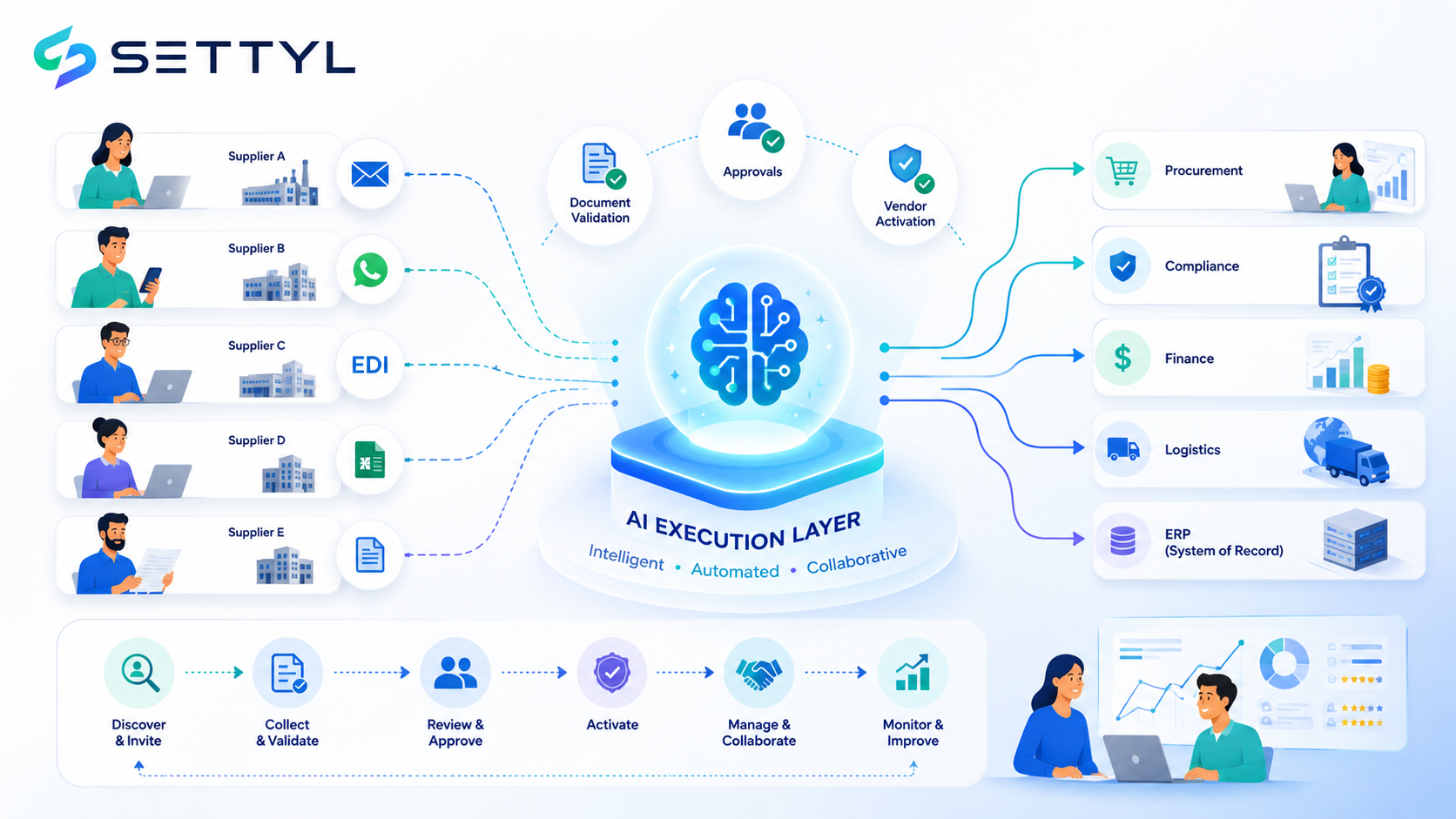
It should collect the required data, identify missing information, validate evidence, route decisions, retain an audit trail and update the ERP after approval.

Here is what changes at each step.

Onboarding activity Manual process Automated process
Supplier request Email or spreadsheet request Structured request with mandatory business context
Supplier classification Manually decided Rules classify supplier by type, spend, geography and risk
Information collection PDFs, spreadsheets and attachments Adaptive digital or conversational collection
Missing information Identified during manual review Detected before submission or immediately after receipt
Document extraction Employees read and re-enter fields AI extracts and maps document data
Validation Separate checks by different teams Rule-based and external-data validations
Compliance review Email handoffs Risk-based workflow with assigned owners
Approvals Follow-ups and reminders Automated routing, escalation and status tracking
ERP creation Manual ticket and re-entry Approved data is written to ERP
Supplier communication Procurement sends updates Automated requests, reminders and status messages
Audit history Distributed across inboxes Unified record of data, documents, decisions and changes
Post-onboarding monitoring Calendar or spreadsheet reminders Certificate, risk and master-data monitoring

Automation reduces the repetitive work, but the more important improvement is continuity.

The transaction no longer disappears between teams.

Traditional portal automation has a supplier-adoption cost

Many onboarding platforms automate the buyer’s internal process by transferring work to the supplier.

The supplier receives a portal invitation and must:

  1. Create an account.
  2. Verify its email address.
  3. Learn a new interface.
  4. Enter information already held in its own systems.
  5. Upload documents in a prescribed format.
  6. Remember another username and password.
  7. Return later to resolve exceptions.

For strategic suppliers working with several major customers, another portal may be manageable.

For a smaller manufacturer, transporter, customs broker, service provider or one-time supplier, portal adoption can become the reason onboarding stalls.

A workflow is not fully automated when procurement stops typing but the supplier is forced to learn and operate another system.

This produces a distorted ROI calculation.

The buyer saves internal effort, but completion rates fall, procurement continues chasing suppliers and the calendar delay remains.

The adopt-nothing model changes the ROI

An adopt-nothing onboarding model does not require every supplier to become an active user of the buyer’s software.

Suppliers can continue responding through familiar channels such as:

  • Email
  • WhatsApp
  • EDI
  • Existing forms
  • Spreadsheets
  • Documents
  • APIs
  • A portal, when the supplier prefers it

Lasya AI interprets the response, extracts the required information, identifies what is missing and continues the workflow across internal teams and systems.

That changes the economics in three ways.

1. Less supplier resistance

The supplier does not need to complete software training before it can provide information.

The experience adapts to the supplier rather than forcing the supplier to adapt to the platform.

2. Faster exception resolution

When information is incomplete, Lasya can request the specific missing field or document through the same channel.

The supplier does not need to sign in, locate the record and determine why it was rejected.

3. More automation beyond supplier activation

Onboarding is not treated as an isolated workflow.

The verified supplier identity, contacts, documents, approvals and risk history become part of the operational memory used in later sourcing, procurement, logistics, EXIM and finance transactions.

This matters because onboarding ROI is weakened when the information collected during onboarding is forgotten immediately afterward.

Side-by-side vendor onboarding ROI comparison

The following table uses illustrative planning assumptions. Replace them with your own volumes, employee costs and automation expenses.

Metric Manual onboarding Portal-based automation Adopt-nothing automation
Calendar cycle time 14–21 days 3–10 days Hours to 3 days for standard cases
Internal labour 12–24 hours 5–10 hours 2–6 hours
Supplier software adoption None Required Not required
Manual data entry High Moderate Low
Follow-up effort High Moderate Low
Validation Manual or fragmented Rules within portal AI extraction plus workflow rules
Approval routing Email-driven Automated Automated across channels and systems
ERP update Often manual Integrated in some deployments Integrated after validation and approval
Exception visibility Spreadsheet or inbox Workflow dashboard Unified transaction and exception memory
Indicative cost per supplier $1,200–$2,400 $500–$1,200 $250–$700
Scale constraint Headcount Supplier adoption Exception volume

These ranges are not universal benchmarks. They illustrate how to structure the comparison.

The actual result will depend on:

  • Supplier complexity
  • Geographic coverage
  • Regulatory requirements
  • Number of approvers
  • Existing ERP integration
  • Document quality
  • Percentage of low-risk and high-risk suppliers
  • Labour cost
  • Supplier responsiveness
  • Automation licensing and implementation cost

A simple formula to calculate vendor onboarding savings

Start with four variables:

  • V: Number of suppliers onboarded per year
  • M: Current manual cost per supplier
  • A: Automated cost per supplier
  • P: Annual platform and operating cost

Annual gross savings

Annual gross savings = V × (M − A)

Annual net benefit

Annual net benefit = [V × (M − A)] − P

ROI percentage

ROI % = annual net benefit ÷ P × 100

Payback period

Payback period in months = P ÷ monthly gross savings

Where:

Monthly gross savings = annual gross savings ÷ 12

Worked example: 200 suppliers per year

Assume a manufacturer onboards 200 new suppliers annually.

Its current process requires approximately 20 employee hours per supplier at a blended cost of $75 per hour.

Manual cost

20 hours × $75 = $1,500 per supplier

200 suppliers × $1,500 = $300,000 annually

Now assume automation reduces the internal effort to six hours per supplier.

Automated processing cost

6 hours × $75 = $450 per supplier

200 suppliers × $450 = $90,000 annually

Assume the annualised platform, integration and operating cost is $75,000.

ROI calculation

Calculation Amount
Manual annual processing cost $300,000
Automated annual processing cost $90,000
Gross labour savings $210,000
Annual platform and operating cost $75,000
Net annual benefit $135,000
First-year ROI 180%
Estimated payback period 4.3 months

This example considers only labour savings.

It does not include:

  • Earlier access to negotiated supplier pricing
  • Reduced emergency purchasing
  • Avoided duplicate or fraudulent payments
  • Reduced compliance remediation
  • Lower master-data correction effort
  • Faster production-material availability
  • Fewer invoice and payment exceptions

Those benefits may materially improve the business case, but they should be added only when the company can measure and defend them.

Add the cost of onboarding delay

Labour savings alone may understate the value for a manufacturer.

A second calculation should measure the value of activating suppliers sooner.

Delay-value formula

Delay value = suppliers affected × days saved × estimated daily business impact

The business impact may include:

  • Price difference between the new supplier and incumbent
  • Production contribution at risk
  • Expedite cost
  • Lost sourcing-event savings
  • Cost of a material shortage
  • Cost of delayed market or plant readiness

Consider a new supplier expected to save $2,000 per week compared with the incumbent.

If onboarding automation activates that supplier two weeks sooner:

$2,000 × 2 = $4,000 in accelerated savings

The benefit is not technically a reduction in onboarding labour.

It is a reduction in the cost of waiting.

For many manufacturers, that may be the larger number.

Do not count every automated hour as cash savings

A credible ROI model should distinguish between three benefit types.

1. Hard savings

Costs that can be removed from the operating budget:

  • Reduced external processing fees
  • Avoided temporary labour
  • Lower outsourced verification cost
  • Reduced software overlap
  • Avoided headcount addition

2. Capacity savings

Employee hours returned to the organisation:

  • Less data entry
  • Fewer reminders
  • Less spreadsheet maintenance
  • Reduced ERP rework
  • Fewer status enquiries

Capacity savings become financial savings only when the organisation redeploys the time or avoids additional hiring.

3. Risk and opportunity value

Benefits that depend on an event or business outcome:

  • Avoided fraud
  • Fewer compliance failures
  • Faster supplier activation
  • Greater sourcing competition
  • Lower supply interruption risk
  • Earlier negotiated savings

Finance teams will normally apply different confidence levels to each category.

Present them separately rather than combining everything into one inflated savings figure.

What should be included in the automation cost?

A weak ROI model compares manual labour against the software subscription alone.

A complete calculation should include:

Cost category What to include
Platform Subscription or usage fees
Implementation Workflow configuration and deployment
Integration ERP, identity, tax, compliance and master-data connections
Data migration Existing supplier-record cleansing and import
Internal change effort Procurement, finance, IT and compliance participation
Supplier enablement Communication or portal support, when required
Operations Exception handling and workflow administration
Maintenance Rule, integration and policy updates

The cost should also account for whether the onboarding tool creates another isolated application.

A cheaper point solution can become expensive when the company must later integrate separate sourcing, procurement, logistics, compliance and finance automation products.

Why onboarding-only automation can limit the return

Vendor onboarding does not end when the ERP vendor code is created.

The supplier may immediately participate in:

  • An RFQ or reverse auction
  • Contract finalisation
  • Purchase-order acceptance
  • Shipment booking
  • EXIM document exchange
  • Delivery confirmation
  • Invoice submission
  • Three-way or four-way matching
  • Payment-exception resolution

When each stage runs through a different platform, the business repeatedly asks for information it already collected.

The transaction loses continuity.

Settyl co-exists with ERP, but replaces the fragmented execution layer surrounding it.

Its native sourcing, procurement, logistics, EXIM, real-time tracking and finance-operations capabilities allow Lasya AI to own the transaction from request to resolution.

The ERP remains the system of record.

Lasya manages the work required to create, validate and update those records while preserving operational memory across:

  • Supplier information
  • Documents
  • Decisions
  • Approvals
  • Exceptions
  • Communications
  • Partner responses
  • ERP updates

The objective is not merely to create a vendor faster. It is to make that vendor transaction-ready across the complete execution lifecycle.

What to measure before approving the investment

Capture a baseline for at least one representative period before implementing vendor onboarding automation.

Measure:

KPI Definition
Onboarding cycle time Request received to ERP-ready supplier
Internal processing hours Total effort across all participating teams
Cost per supplier Labour, verification and technology cost
First-time-right rate Percentage completed without correction
Supplier response time Time suppliers take to provide requested information
Internal queue time Time waiting between departments
Number of follow-ups Emails, calls and reminders per supplier
Exception rate Percentage requiring manual intervention
ERP rejection rate Records rejected or returned by master-data teams
Post-activation correction rate Supplier records changed shortly after creation
Compliance completion Percentage activated with all required evidence
Time to first transaction Approval to first PO, shipment or invoice

Do not measure automation success only by how quickly the form is submitted.

Measure the time to a compliant, approved and transaction-ready supplier.

When vendor onboarding automation has the strongest ROI

Automation is most likely to produce a compelling return when:

  • Supplier volumes are high.
  • Several departments participate in approval.
  • Suppliers operate across multiple countries.
  • Quality or regulatory documents must be validated.
  • Procurement spends significant time chasing information.
  • The ERP master-data team faces recurring rework.
  • New suppliers are frequently required for urgent sourcing.
  • Supplier information must be reused across logistics and finance.
  • The company is adding headcount to support onboarding volume.
  • Existing portals suffer from low supplier adoption.

A company onboarding only a few low-risk suppliers each year may not need an enterprise-scale programme.

But manufacturers with fragmented workflows should not judge volume only by the number of new suppliers.

Supplier renewals, bank changes, certificate expirations, plant extensions, tax updates and compliance reviews can create a much larger recurring workload.

The final ROI question

The standard business case asks:

How much labour can onboarding automation save?

That is necessary, but incomplete.

The more important questions are:

  • How much business time is lost while suppliers wait between teams?
  • How many sourcing decisions are delayed because a vendor is not active?
  • How much rework is created by incomplete or inconsistent supplier data?
  • How often must information be collected again in procurement, logistics or finance?
  • How much does the business spend persuading suppliers to use another portal?
  • What happens to the onboarding history after the ERP record is created?

Traditional automation improves the form.

A connected execution layer improves the transaction.

And an adopt-nothing execution model changes the ROI again—because the company can automate the workflow without making supplier software adoption a prerequisite for participation.

Frequently asked questions

How much does manual vendor onboarding cost?

Manual vendor onboarding cost varies according to supplier complexity, employee cost, compliance requirements and the number of participating departments. A practical calculation is to multiply the total employee hours per supplier by the organisation’s blended hourly labour cost, then add verification, technology, rework and delay costs. The $1,200–$2,400 range used in this article is an illustrative planning assumption, not a universal benchmark.

What is the ROI of automating supplier onboarding?

Calculate the annual difference between manual and automated processing costs, subtract the annual platform and operating cost, and divide the resulting net benefit by the automation investment. The business case can also include measurable benefits from faster supplier activation, reduced rework and avoided headcount.

How long does automated supplier onboarding take?

Standard, low-risk suppliers can sometimes be processed within hours or a few days when information is complete and validations are available. Complex suppliers requiring legal, quality, security, financial or regulatory reviews will take longer. Automation primarily reduces administrative effort and waiting time; it does not eliminate legitimate due diligence.

Does vendor onboarding automation replace ERP?

No. ERP remains the system of record for the approved supplier master. The automation layer collects and validates information, coordinates reviews and approvals, manages exceptions and writes the approved supplier data into ERP.

What is adopt-nothing supplier onboarding?

Adopt-nothing onboarding allows suppliers to provide information through channels they already use, such as email, WhatsApp, EDI, spreadsheets and documents. The supplier is not forced to register for and operate another software portal before participating.

What costs should be included in an onboarding ROI calculation?

Include internal labour, supplier follow-ups, verification services, rework, ERP master-data effort, implementation, integration, platform fees, ongoing operations and the financial impact of delayed supplier activation.

Which vendor onboarding metrics should manufacturers track?

Manufacturers should track cycle time, processing hours, cost per supplier, first-time-right rate, follow-up volume, exception rate, ERP rejection rate, compliance completion and time from supplier approval to the first transaction.

Related Guides

Ongoing Supplier Management

How to onboard and manage suppliers without asking them to join a portal, adopt a platform or change how they work. The adopt-nothing mechanism, explained.

Procure-to-Pay AI Execution Flow

Procure to pay process flow showing AI execution layer handling each handoff from PO to invoice

Why AI in One Function Won’t Fix Your Supply Chain

Learn why isolated AI tools create faster functional silos without solving the handoffs between procurement, logistics, EXIM, finance, and ERP workflows.

Autonomous Supply Chain Execution: The Complete Guide to the AI Supply Chain Operating System

Explore how specialised AI agents, workflow orchestration, ERP connectivity, execution memory, and multi-enterprise coordination come together in one execution layer.

Supply Chain Trends 2026: The Shift From Visibility to Execution Memory

Understand why supply chain technology is moving beyond dashboards and alerts toward systems that can act, remember, and improve.

Share this post
Gokulganth TM
June 14, 2026
5 mins

Bring last month's exceptions.
Leave with the ROI model.

30-minute working session for the CFO and Controller. We'll run your real exception backlog through Lasya, project the working-capital release, and walk through the audit-trail evidence your InfoSec team will request.

Wireframe globe composed of overlapping blue ellipses and circles on a transparent background.